

Product
Scanner Reports AI Integration
Resources
Guides Research Security checklist Docs Status
Account
Sign in Scan your app free

Epherem is the free source-code security scanner for apps built with AI tools. Connect GitHub or upload a ZIP. 55 checks read your code for exposed keys, open database tables, missing login and ownership checks and unsafe input. The full report is free with nothing hidden, and there’s no AI in the scan.

For apps built with Lovable, Bolt, v0, Replit, Cursor and Claude Code.

Your AI can fix it. It can’t reliably find it.

So why not just ask it to check? Because typing “check my app for security” isn’t the same as checking it. And if you don’t read code yourself, you can’t tell what it skipped.

Asking your AI
An Epherem scan
Ask twice, get two different answers. Each run reads your app a little differently.
Same code, same report. The same checks run every time.
Much of what it flags isn’t real. In one test, 82–86% of what the AI tools reported weren’t real problems.
Each finding says how sure it is. “Likely” when it saw the risky code itself, “needs checking” when it looked for a protection and didn’t see it, or the match depends on context it can’t see.
It loses track on a bigger app. It runs out of room, skims, and misses how one file leads to the next.
55 checks across your project. Your report says what it couldn’t read.
It’s an AI model writing a fresh answer each time.
There’s no AI in the scan. It isn’t your AI with a new label.
Then hand the findings to your AI. Fixing a problem it’s been pointed at is what it’s good at. See a finding and its fix prompt ↓

Upload your whole project

Upload a ZIP or connect GitHub. Epherem reads your code, your settings files and your package list. It never runs your app.

Scan for common mistakes

55 checks look for exposed keys, open database tables, missing login and ownership checks, and unsafe input. Your packages are checked against published advisories.

See where each problem is

Each finding shows the file, the line and the code, and what someone could do with it. Likely issues are the ones where the scanner saw the risky code itself, so you know where to start.

Your AI tool Fix prompt
›

Fix it with your AI tool

Every finding comes with a prompt for Cursor, Lovable or Claude Code. Paste it, let your AI make the change, then scan again.

What it knows, and where to look.

Epherem keeps them apart. Known issues are published advisories that match a package version you use. Likely issues are where the scanner saw the risky code itself: start there. Findings that need checking are where it looked for a protection and didn't see it, or where the match depends on context it can't see. And anything it can't read is named.

What a report sorts out

Every report sorts what it found into what Epherem knows, what's likely, what's worth a check, and what it couldn't read.

Known
A published advisory matches a package version you use.
3
Likely issues
The scanner saw the risky code itself. Start here.
4
Needs checking
It looked for a protection and didn't see it, or the match depends on context it can't see. It may exist somewhere the scan couldn't see.
8
Not analysed
Named in your report, never counted as clean.
3 files

Your dependencies, checked

Packages with exact versions (from a lockfile) are checked against published advisories. Without a lockfile, the report says which ones it couldn't check.

next 14.1.0High
Server Actions can be made to send requests to other servers.
GHSA-fr5h-rqp8-mj6g
axios 1.5.1Medium
Can send your CSRF token to other websites.
GHSA-wf5p-g6vw-rhxx
jsonwebtoken 8.5.1Medium
Default settings can accept tokens without a valid signature.
GHSA-qwph-4952-7xr6

Layered scanning

Your code, your settings files and your packages are each checked. Findings point to the exact file and line. Scan again after you change something: each scan is a new report of your code as it is now.

Fix, then scan again

Paste the fix prompt into your AI tool, then run another free scan. Each scan is a new report of your code as it is now.

src/lib/supabase.ts
−6"eyJhbGciOiJIUzI1NiIs••••••••"
+6process.env.NEXT_PUBLIC_SUPABASE_ANON_KEY

A report written for whoever built the app.

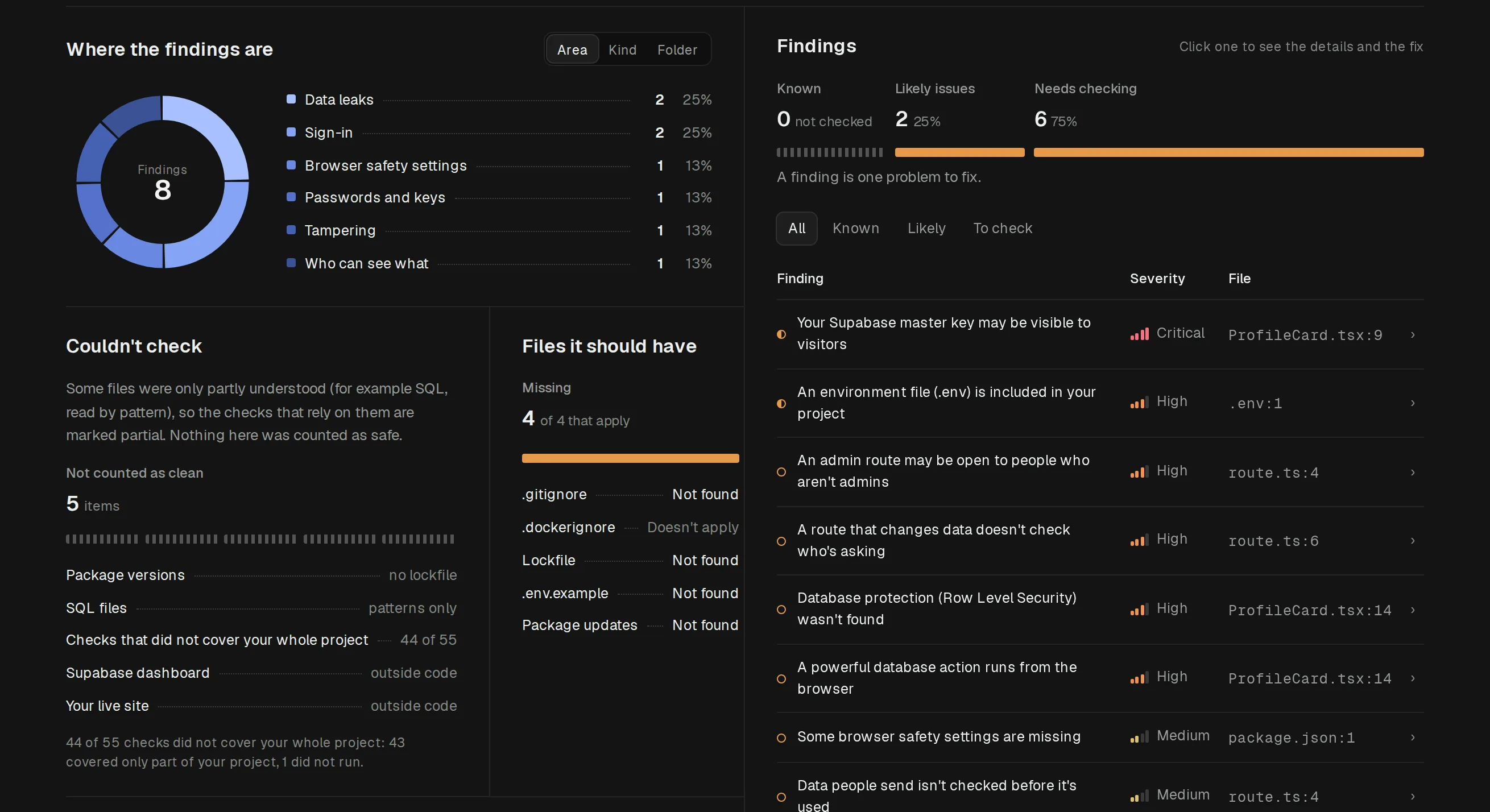
Each finding says in plain words what's wrong, then what someone could actually do with it, how to fix it, and the file and line. Findings come in three groups: known issues, likely issues, and findings that need checking. Packages with exact versions (from a lockfile) are checked against published advisories. And every report says what Epherem couldn't check, so a quiet report never pretends to be a clean one.

Example report in Epherem: where the findings are, by area, the findings list with each finding's plain title, severity and file, what the scan couldn't check, and the files a project should have

Your AI wrote it. Your AI can fix it.

Every finding says what's wrong in plain words and what someone could do with it, then hands you a prompt to paste into Cursor, Lovable or Claude Code. A few things, like rotating a leaked key, you'll still do yourself.

Likely issue

Your Supabase service-role key is in code the browser downloads

4export const supabase = createClient(
5 process.env.NEXT_PUBLIC_SUPABASE_URL,
6 "eyJhbG…[redacted]…x9Q" // service_role, masked
7)

What someone could do

Anyone who opens your site can copy this key and read, change or delete every row in your database. The key skips your row-level security rules.

How to fix it

Use the anon key in browser code. Keep the service-role key in a server-only variable (no NEXT_PUBLIC_ prefix), then rotate the exposed key in Supabase.

Fix prompt for Cursor, Lovable or Claude Code

In src/lib/supabase.ts the Supabase client is created with the service-role key, and this file is bundled into the browser. Change it to use the anon key from NEXT_PUBLIC_SUPABASE_ANON_KEY. Move anything that really needs the service-role key into a server-only API route that reads SUPABASE_SERVICE_ROLE_KEY (no NEXT_PUBLIC_ prefix). Don't change my row-level security policies. List every file you changed.

Your AI tool can't rotate the leaked key for you. Do that yourself in your Supabase dashboard.

Not checked in this project Supabase dashboard settings (we only read what's in your code) · 3 Go files (Go isn't analysed, so it isn't reported as clean)

Questions, answered.

What Epherem does, and what it doesn’t.

You can, and it may catch something. But a “check my security” request isn’t a systematic check. The AI reads what fits in its memory, can give a different answer each time you ask, and won’t always say what it didn’t look at. Epherem runs the same fixed checks every time and tells you what it couldn’t read. Then your AI is the right tool for the next step: paste a finding’s fix prompt and let it make the change.
Your app’s source code: who can see and change data, keys and secrets, how input is handled, and security settings. It also checks your packages against published security advisories. It works best on JavaScript and TypeScript; Python is partly covered, and other languages are listed in your report as not analysed.
No. No scanner can show that an app is secure. Epherem points out common mistakes and tells you what it couldn’t check.
Not always. Known issues match a published advisory for a package version you use. Code findings are split into likely issues, where the scanner saw the risky code itself, and findings that need checking, where it looked for a protection and didn’t see it, or the match depends on context it can’t see; the protection may exist somewhere the scan couldn’t see. Epherem reads your code without running your app, so it can’t confirm a code finding for you.
Not in the scan. It uses fixed checks and a public advisory database, not an AI model. The operator may use AI tools to help run Epherem, and they may see your reports, including the code excerpts in them (Privacy Policy, section 9). You can paste a finding’s fix prompt into your own AI tool if you want to.
Your uploaded code is used only to run the scan, then deleted. Your report is kept in your account until you delete it. It includes file paths, line numbers and short code excerpts, with anything that looks like a key or password masked.
People building apps with AI tools like Lovable, Bolt, v0, Cursor, Replit and Claude Code, especially if you don’t read much code yourself.
Yes. Upload a ZIP of your project, or connect GitHub and choose a private repository.
No. Epherem never changes your code. Each finding comes with a suggested fix and a prompt for your AI tool. Scan again afterwards: each scan is a new report of your code as it is now.
No. It looks for the mistakes AI-built apps commonly make. It can’t see your live site or settings outside your code, like your Supabase dashboard. Every report lists what wasn’t checked.
No. Each finding explains in plain words what’s wrong, what someone could do with it and how to fix it.
Nothing during early access. Each account can run 5 scans a day. If that ever changes, we’ll say so on this site first, and Epherem will never charge you unless you choose to pay.
Yes. Connect GitHub and choose a repository, or upload a ZIP.

Ship with your eyes open.

Scan before you deploy. See what your AI may have left exposed, fix it with your AI tool, then scan again. Free during early access, 5 scans a day.